# Spring Boot + OAuth2 GitHub

 ## Перед запуском
### Создание OAuth Application
Для запуска понадобиться обзавестить своим **GitLab**.
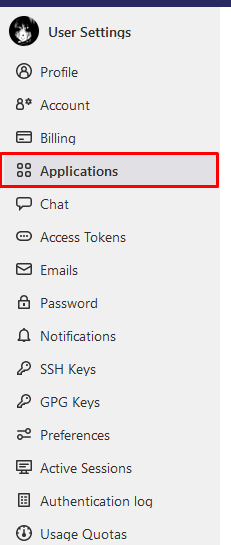
1. Переходим в [Applications](https://gitlab.com/-/profile/applications)
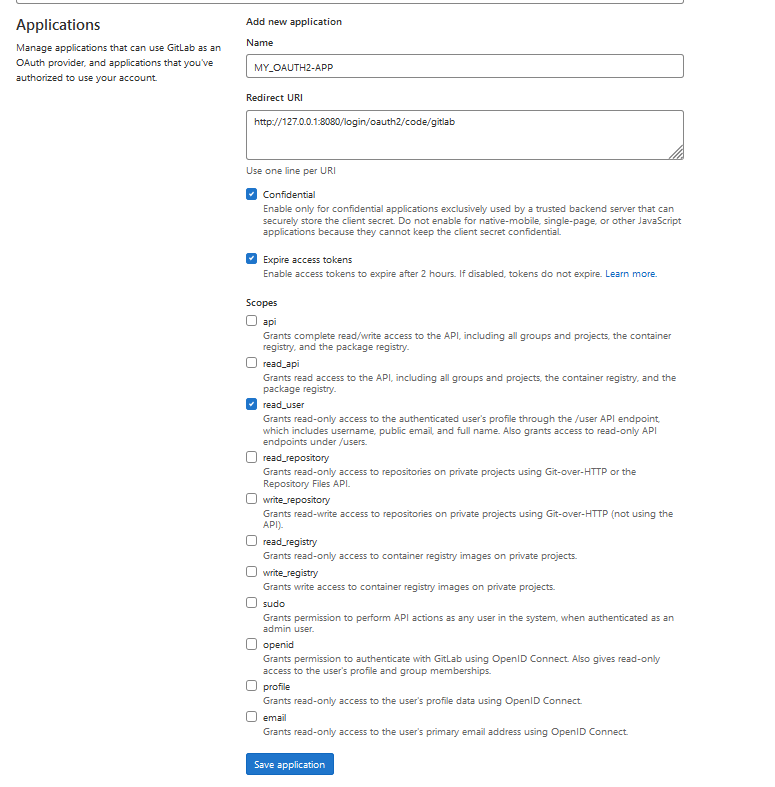
2. Заполняем обязательно следующие поля
- **Name**: `MY_OAUTH2-APP`
- **Redirect URI**: `http://127.0.0.1:8080/login/oauth2/code/gitlab`
- **Scopes**: `read_user`
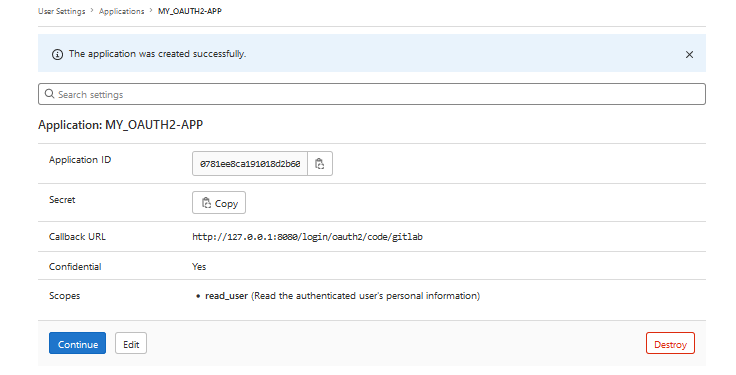
3. Получаем **Client secret/Client ID**
### Настройка Spring
Открываем файл `src/main/resources/application.yml` и указываем там **Client ID** и **Client secrets**:
```yaml
spring:
security:
oauth2:
client:
registration:
gitlab:
client-id: 0781ee8ca191018d2b60eb68b1a0b2af5c4765fbbf51cd297c95fa59b9ff99ae
client-secret: ef19ea39b87f3be6532108d455ae7f962c1e77132b82fa1a7a4f6f93470534de
```
## Перед запуском
### Создание OAuth Application
Для запуска понадобиться обзавестить своим **GitLab**.
1. Переходим в [Applications](https://gitlab.com/-/profile/applications)

2. Заполняем обязательно следующие поля
- **Name**: `MY_OAUTH2-APP`
- **Redirect URI**: `http://127.0.0.1:8080/login/oauth2/code/gitlab`
- **Scopes**: `read_user`

3. Получаем **Client secret/Client ID**

### Настройка Spring
Открываем файл `src/main/resources/application.yml` и указываем там **Client ID** и **Client secrets**:
```yaml
spring:
security:
oauth2:
client:
registration:
gitlab:
client-id: 0781ee8ca191018d2b60eb68b1a0b2af5c4765fbbf51cd297c95fa59b9ff99ae
client-secret: ef19ea39b87f3be6532108d455ae7f962c1e77132b82fa1a7a4f6f93470534de
```