

Yandex Music Downloader


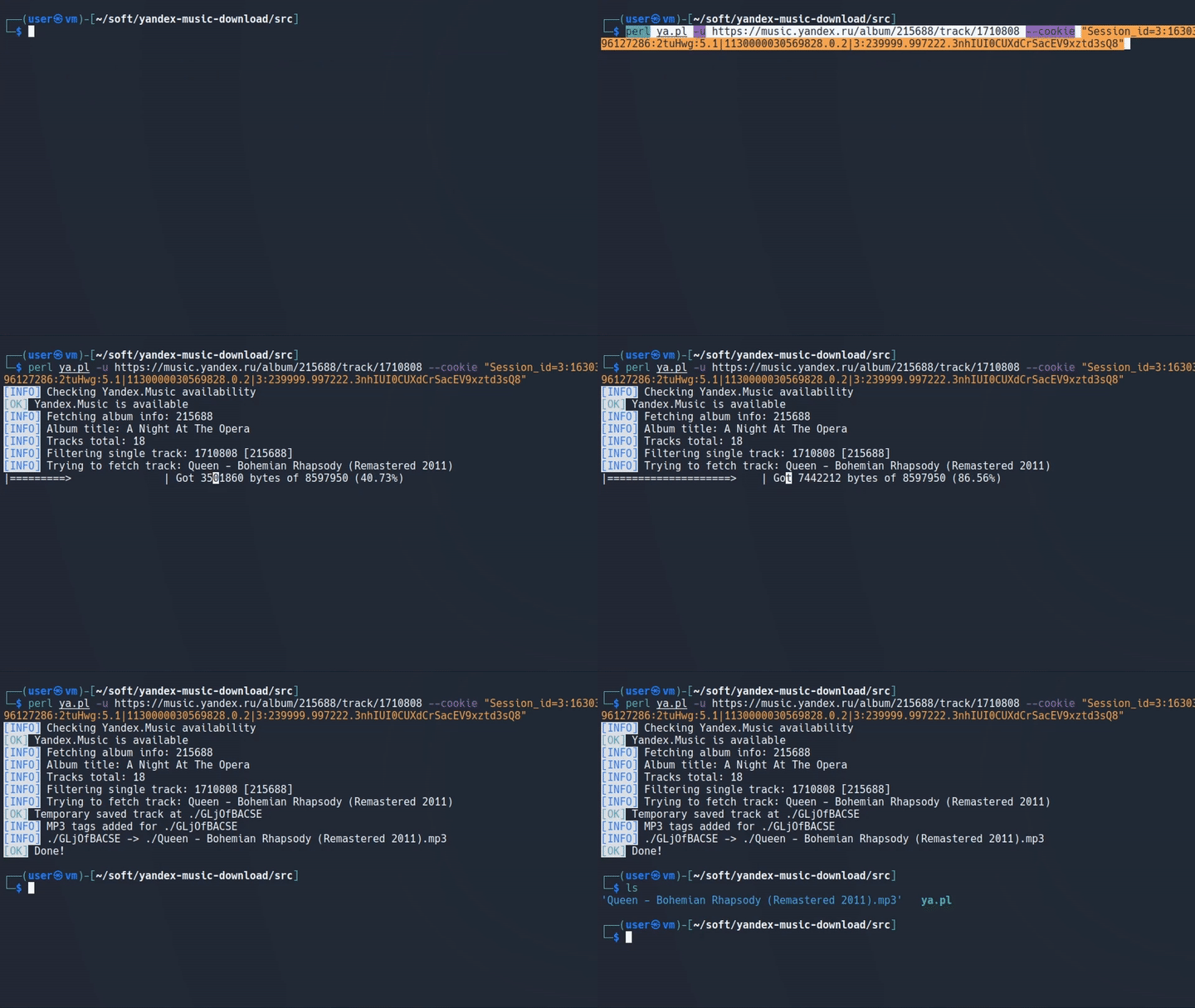
Simple command line Perl script for downloading music from Yandex Music (http://music.yandex.ru). Origin of the script is the following article: https://kaimi.io/2013/11/yandex-music-downloader/
Contents
Requirements
Environment
- Linux/Windows/MacOS (anything, that runs Perl)
- Perl >= 5.12
Perl modules
-
General
- Digest::MD5
- File::Copy
- File::Spec
- File::Temp
- Getopt::Long::Descriptive
- HTML::Entities
- HTTP::Cookies
- JSON::PP
- LWP::Protocol::https
- LWP::UserAgent
- MP3::Tag
- Term::ANSIColor
- Mozilla::CA
-
Windows-only modules
- Win32::API
- Win32::Console
- Win32API::File
Installation
Ubuntu / Debian
# Prerequisites
sudo apt-get update
sudo apt-get -y install perl cpanminus make git
sudo apt-get -y install libwww-perl liblwp-protocol-https-perl libhttp-cookies-perl libhtml-parser-perl libmp3-tag-perl libgetopt-long-descriptive-perl libarchive-zip-perl
cpanm Mozilla::CA

# Get a copy and run
git clone https://github.com/kaimi-io/yandex-music-download.git
cd yandex-music-download/src
perl ya.pl -h
MacOS
- Install brew (https://brew.sh/)
- Run:
brew update
brew install perl cpanminus git

git clone https://github.com/kaimi-io/yandex-music-download.git
cd yandex-music-download/src
perl ya.pl -h
Windows
With WSL (Windows Subsystem for Linux) installation will be similar to Ubuntu / Debian. Otherwise:
- Download and install ActiveState Perl (https://www.activestate.com/products/perl/downloads/) or Strawberry Perl (http://strawberryperl.com/)
- Ensure, that Perl was added to system
PATHenvironment variable - From Windows command line run:
perl -vIt should output Perl version. If not, refer to your Perl distribution documentation about adding Perl to yourPATHenvironment variable - Install required modules (it can be done via PPM if you're using ActiveState Perl):
cpan install Digest::MD5 File::Copy File::Spec File::Temp Getopt::Long::Descriptive HTML::Entities HTTP::Cookies JSON::PP LWP::Protocol::https LWP::UserAgent MP3::Tag Mozilla::CA Term::ANSIColor Win32::API Win32::Console Win32API::File
- Download and unpack Yandex Music Downloader (https://github.com/kaimi-io/yandex-music-download/archive/master.zip)
- Run:
cd yandex-music-download/src
perl ya.pl -h
Docker
- Install Docker (https://docs.docker.com/get-docker/)
- Run:
git clone https://github.com/kaimi-io/yandex-music-download.git
cd yandex-music-download
docker build --tag yandex-music-downloader:1.0 .
docker run --rm -v $(PWD):/root/ --name yamusic yandex-music-downloader:1.0 -d /root -u https://music.yandex.ru/album/215688/track/1710808
Usage
ya.pl [-adkptu] [long options...]
	-p --playlist     playlist id to download
	-k --kind         playlist kind (eg. ya-playlist, music-blog,
	                  music-partners, etc.)
	-a --album        album to download
	-t --track        track to download (album id must be specified)
	-u --url          download by URL
	-d --dir          download path (current direcotry will be used by
	                  default)
	--proxy           HTTP-proxy (format: 1.2.3.4:8888)
	--exclude         skip tracks specified in file
	--include         download only tracks specified in file
	--delay           delay between downloads (in seconds)
	--mobile          use mobile API
	--auth            authorization header (for HQ music if subscription
	                  is active)
	--bitrate         bitrate (eg. 64, 128, 192, 320)

	Bitrate 320 is available only when subscription is active
	and only via mobile API for now (be sure to specify Authorization header value)

	--debug           print debug info during work
	--help            print usage

	--include and --exclude options use weak match i.e. ~/$term/

	Example:
	ya.pl -p 123 -k ya-playlist
	ya.pl -a 123
	ya.pl -a 123 -t 321
	ya.pl -u https://music.yandex.ru/album/215690
	ya.pl -u https://music.yandex.ru/album/215688/track/1710808
	ya.pl -u https://music.yandex.ru/users/ya.playlist/playlists/1257
FAQ
What is the cause for "[ERROR] Yandex.Music is not available"?
Currently Yandex Music is available only for Russia and CIS countries. For other countries you should either acquire paid subscription and use --auth parameter or use it through proxy (--proxy parameter) from one of those countries.
Contribute
If you want to help make Yandex Music Downloader better the easiest thing you can do is to report issues and feature requests. Or you can help in development.
License
Yandex Music Downloader Copyright © 2013-2020 by Kaimi (Sergey Belov) - https://kaimi.io
Yandex Music Downloader is free software: you can redistribute it and/or modify it under the terms of the Massachusetts Institute of Technology (MIT) License.
You should have received a copy of the MIT License along with Yandex Music Downloader. If not, see MIT License